Book a demo

For independent electronic component distributors and brokers

From RFQ to shipment, every component deal in one place.

Right now your RFQs sit in inboxes, your vendor prices in spreadsheets and your inspection notes on paper. ComponentCRM puts the whole deal in one system built for the way you trade excess and shortage parts.
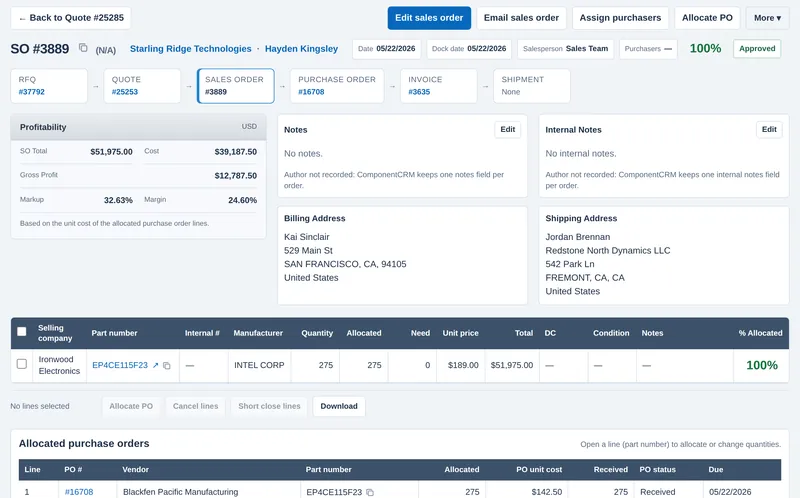
A ComponentCRM sales order showing the linked RFQ, quote, purchase order and invoice, with cost, gross profit, markup and margin.
A sales order with its RFQ, quote, purchase order and invoice linked across the top, and the same system on a phone at the inspection bench.

What changes for your team

Quote faster

Your buyers see every past vendor price, stock offer, quote and order for a part on the screen where they are working. Your salespeople build the quote with cost, profit and margin shown as they go.

How sourcing works

Never lose an RFQ

Forward a customer's RFQ email and it becomes an RFQ with the part, quantity and target price filled in. Every RFQ has a status, a salesperson and assigned purchasers, so nothing sits unanswered in someone's inbox.

How RFQ intake works

Inspection and compliance built in

Parts are inspected against a checklist when they arrive and again before they ship. Stock only becomes inventory after inbound inspection, and an export-classification report can be requested from the order.

How inspection works

Built around the way a component deal actually moves

RFQ, sourcing, quote, sales order, purchase order, receiving, inspection, shipping, invoice. Every step is a linked record, so anyone on your team can open any document and see the rest of the deal.

RFQs
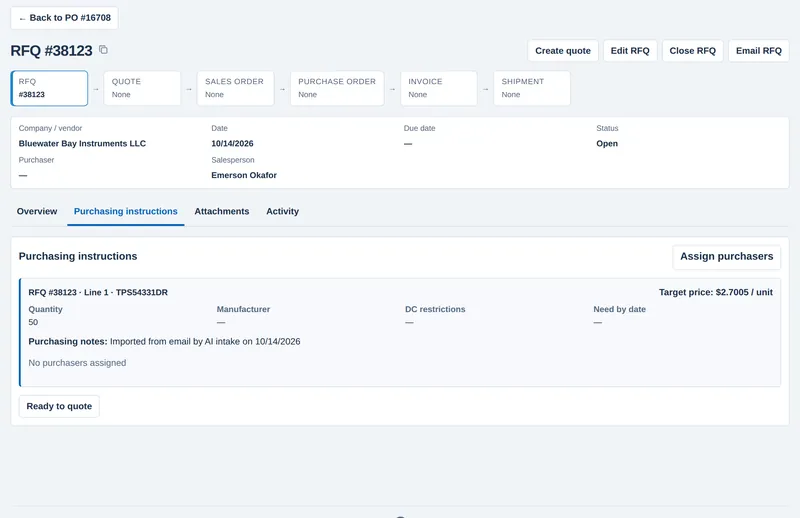
RFQs from your inbox, assigned before they go cold

  • Forward a customer email to your ComponentCRM import address and an RFQ is created with the customer, part number, quantity and target price.
  • Enter RFQs by hand or upload a BOM or multi-line list.
  • Assign purchasers to each line, add purchasing instructions (DC restrictions, need-by date, target price) and mark it ready to quote when the pricing is in.
  • Open, quoted, no-bid and closed RFQs are one search away, by customer, part, salesperson or date.
An RFQ created from a customer email, with purchasing instructions showing quantity, target price and an Assign purchasers button.
An RFQ imported from a customer email, ready for purchasers.

Sourcing

Your buyers see what each part cost last time

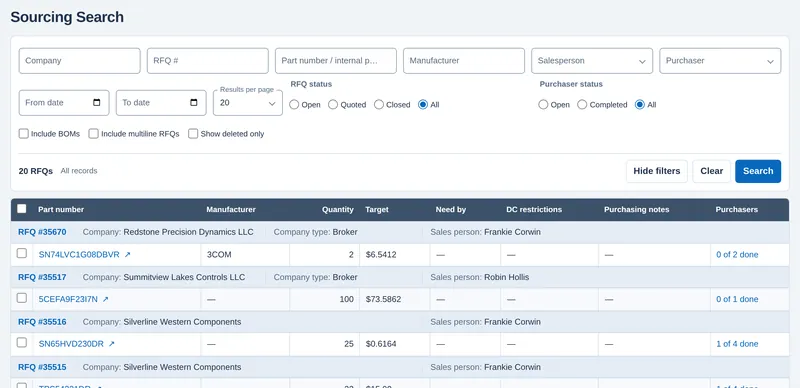
  • The sourcing queue shows every RFQ line waiting for pricing, with the target price, quantity and how many purchasers have finished.
  • For any part number, the pricing panel shows vendor prices, stock offers, past RFQs, quotes, sales orders and purchase orders, excess lists and your own inventory.
  • Pull current distributor pricing, email suppliers, or turn a vendor price into a purchase order allocated to the sales order line.
The sourcing search listing RFQ lines with part number, quantity, target price, salesperson and purchaser progress.
The sourcing queue for purchasers.

Quotes and sales orders

Know the margin before you say yes

  • Quotes are built from the RFQ and the vendor prices you selected. Cost, gross profit, markup and margin are calculated as you build.
  • Turn an accepted quote into a sales order and the profitability carries over, based on the cost of the purchase order lines allocated to it.
  • RFQ, quote, sales order, purchase order, invoice and shipment are linked across the top of every record.
A sales order showing profitability, the linked documents and the allocated purchase order.
A sales order, fully allocated to its purchase order.

Purchasing and approvals

Buy what you sold, inside the limits you set

  • "SO - Need to buy" lists every sales order line that still needs stock, so nothing gets sold and forgotten.
  • Allocate purchase order lines to sales order lines and watch the allocation status update.
  • Set approval limits by role for quotes, sales orders and purchase orders. Orders under a user's limit are approved automatically; larger ones wait for someone with a higher limit.
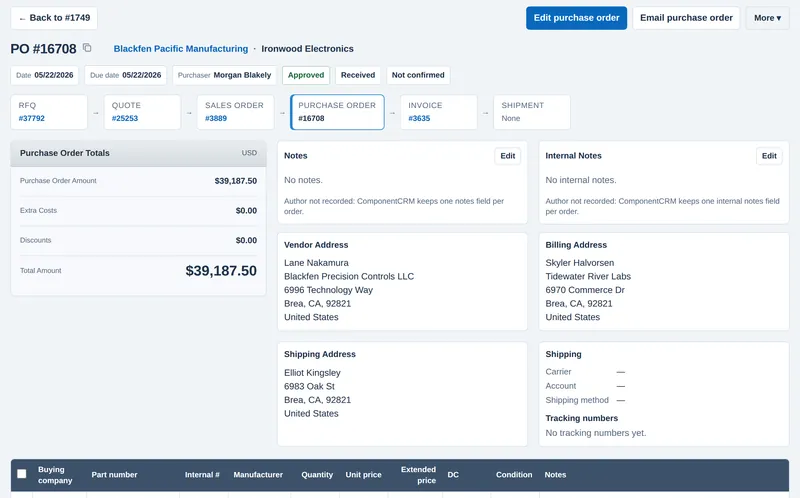
A purchase order marked Approved and Received, linked to its RFQ, quote, sales order and invoice.
An approved, received purchase order.

Receiving and inspection

Nothing ships that hasn't been inspected

  • Receive against the purchase order. Each received lot opens an inbound inspection.
  • The checklist covers tampering, ESD and moisture packaging, labels and manufacturer labels, remarking, test dots, leads, scratches, surfaces and dimensions, with photos.
  • Stock becomes inventory only when the inspection is finished, with date code, lot code, condition and country of origin recorded.
  • Every allocation to a sales order gets an outbound inspection before it is ready to ship.
  • The warehouse screens work in a phone browser, so inspectors can work at the bench.
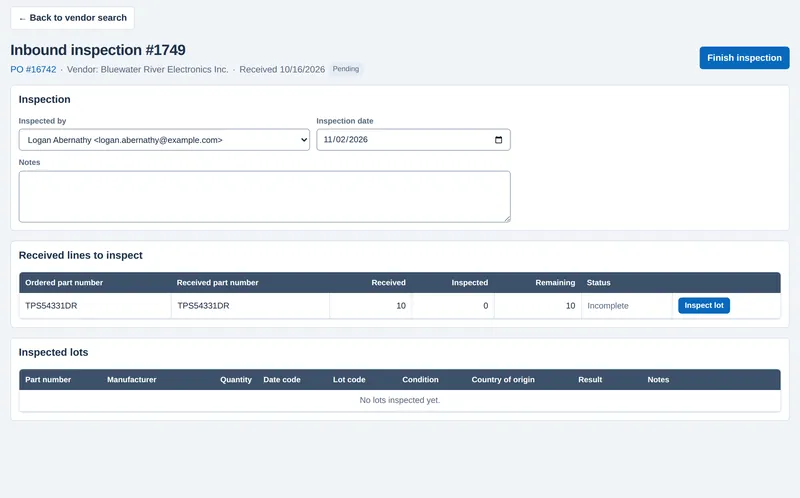
An inbound inspection with the received lines to inspect and the inspected lots table.
Inbound inspection on a desktop.
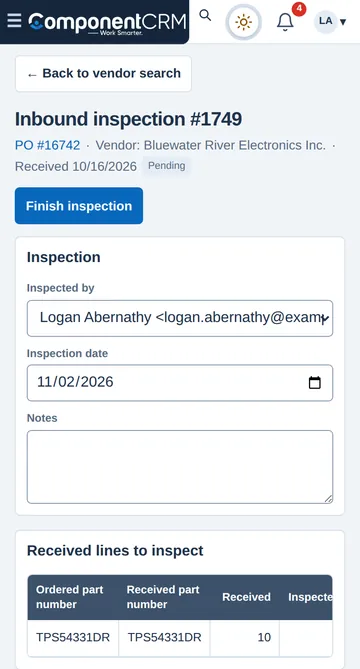
The same inbound inspection on a phone screen.
The same inspection on a phone.

Export compliance

Export classification without leaving the order

  • From a sales order, request an export-control determination for the parts and destination countries, with the end-user certificate attached.
  • ComponentCRM drafts an ECCN determination report as a PDF for your compliance person to review and keep with the order.

Also in ComponentCRM

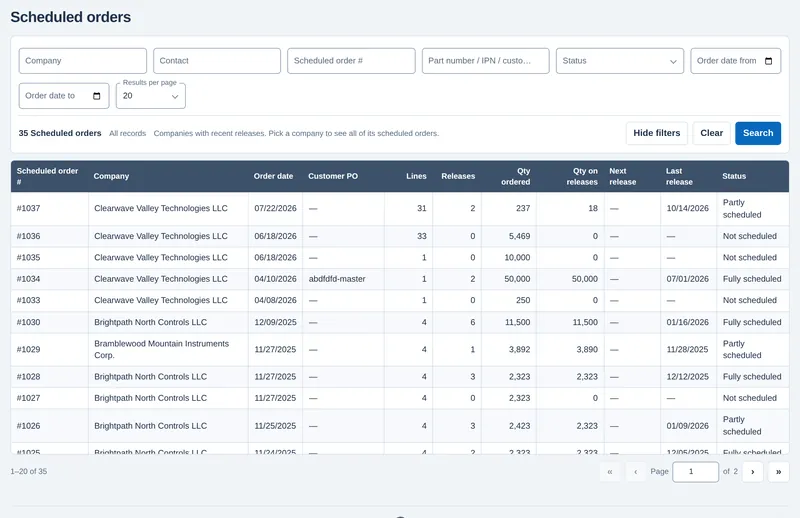
The scheduled orders list with order dates, lines, releases and status.
Scheduled orders. Split a blanket order into dated releases and see what is scheduled and what has shipped.
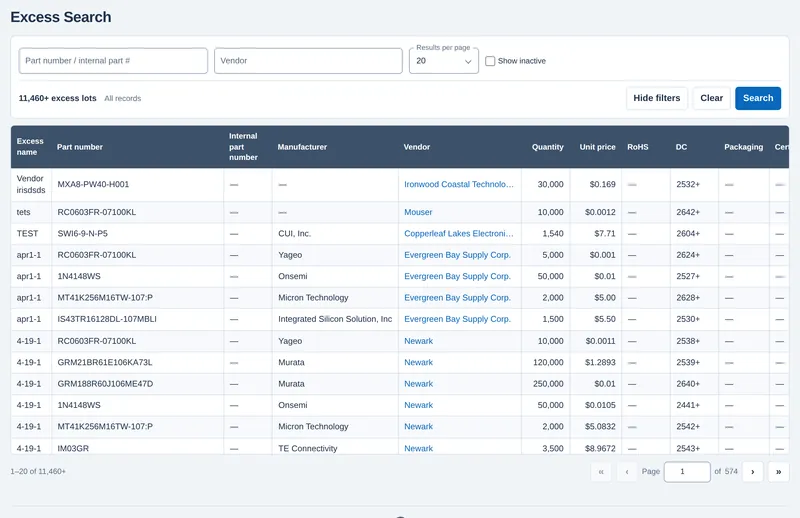
The excess search listing part numbers, manufacturers, vendors, quantities and prices.
Excess lists. Load excess and stock offers from your contacts and search them by part number next to your RFQs.
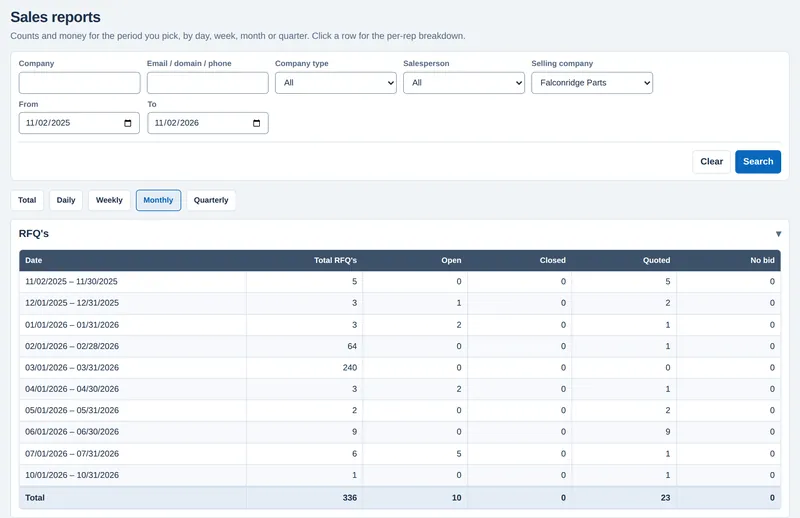
The sales report showing RFQ counts by month, open, closed and quoted.
Sales reports. RFQs, quotes and orders by day, week, month or quarter, by salesperson or customer.
  • Customer and vendor portal (read-only) for RFQs, quotes, orders and invoices
  • Testing lab quotes and results
  • Customer and vendor RMAs
  • Consignment stock
  • Invoices, payments and credits
  • Multiple selling companies and currencies

The ComponentCRM family

Two more tools from the team behind ComponentCRM.

Mobile app

InventoryCapture

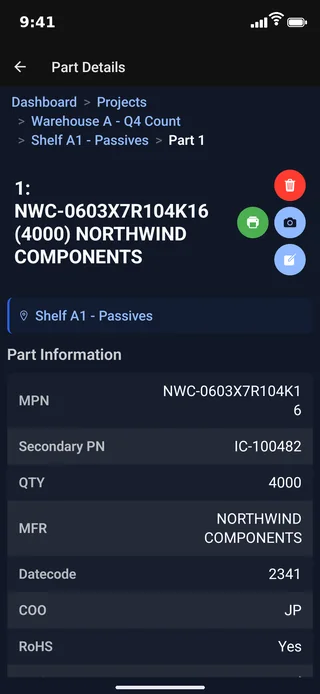
The warehouse inventory-capture app. Photograph your stock, and each part is catalogued by shelf and sent to ComponentCRM.

Download InventoryCapture on the App Store Get InventoryCapture on Google Play
Visit the InventoryCapture site
InventoryCapture on a phone, showing a captured part with its shelf, part number, quantity, manufacturer, date code and country of origin.

Coming soon

BOMWise

Your team's bill of materials in one place. No more emailing spreadsheets.

Everyone works on the same BOM, so you never have to ask which file is the latest.

Get early access

How a demo works

  1. Tell us about your team

    Fill in the short form below. It takes about a minute.

  2. We set a time

    We reply by email or phone to book a screen-share at a time that suits you.

  3. We walk through a real deal

    Bring a part list or an RFQ you are working on. We follow it from RFQ to quote, order, purchase, receiving, inspection and shipping, on demo data.

  4. You decide

    If it fits, we talk about bringing in your customers, vendors and stock. If it doesn't, no follow-up chasing.

Questions

Who is ComponentCRM for?

Independent distributors and brokers of electronic components: teams that answer RFQs, source from many vendors, buy against sales orders, and receive, inspect and ship parts from their own warehouse.

Does it replace our spreadsheets and email folders?

That is the idea. RFQs, vendor prices, quotes, orders, receiving and inspection records live in one system and link to each other. Email still works the way you are used to: you can forward RFQ emails in and email quotes and orders out.

Can we bring in our existing data?

Yes. ComponentCRM has uploads for BOMs and multi-line RFQs, inventory, excess lists and vendor prices. We look at your current data during the demo.

Does the warehouse need special hardware or an app?

No. Receiving and inspection run in the browser, including on a phone, so your inspectors can work at the bench.

We sell from more than one company or in more than one currency. Does that work?

Yes. You can run several selling companies, each with its own home currency, and quote or order in the customer's currency.

Can our customers see their own orders?

Yes. The portal gives your customers and vendors a read-only login to see their RFQs, quotes, orders, invoices and excess lists.

How long will setup take?

It depends on the size and shape of your data. Once we have your data in the right format, your account is usually fully set up within 48 hours. If you don't have IT staff to format it, we can do that for you.

Is there a walk-through of the software?

Better than that: ComponentCRM includes a chat-based AI assistant that guides you step by step, even through the more complex tasks.

Do you offer customer support? What are your hours?

Yes. Our AI assistant is available around the clock, and existing clients have 24-hour emergency technical support. With offices on the US East and West Coasts and in Colorado, our business hours are 9am to 9pm Eastern (7am to 7pm Mountain, 6am to 6pm Pacific, 2pm to 2am UK), Monday through Friday.

How long have you been in business?

Our official birthday is February 6, 2018.

What happens on the demo?

A live screen-share with someone who knows the component business. We follow one deal from RFQ to shipment and answer your questions. There is nothing to install.

Book a demo

See your own kind of deal run through ComponentCRM, from RFQ to shipment.

Prefer the phone? Call 662-GET-CCRM (662-438-2276), Monday to Friday, 6 am to 6 pm Pacific.